Execute a Route
Couriers scan bags collected at a client site and then associate those bags with the boxes they are placed in for transport. Bags may be packed into boxes immediately upon pick up, or bags from multiple clients may be consolidated later in boxes prior to shipping. See the No bags to pick up, Delete a pick up, and Unlisted Client sections for information on those specific scenarios. See the Immediately pack bags in a box section to quickly pack bags in a box without needing to re-enter/re-scan the box ID's.
Note: The first time you use your phone’s camera as a scanner, a pop-up displays asking for permission. Apple devices ask for permission every time, unless you update the camera settings. To allow permission, navigate to Settings > Safari > Camera > Allow.
 Pick up a bag
- Select EXECUTE ROUTE. The Execute Route screen opens.
Tip: If you have not checked into the application and your administrator has enabled the Inspection Log, the Check In screen displays and you must check in before executing a route.
Note: If you are assigned to Courier Organizations, the Select Route screen opens after selecting EXECUTE ROUTE, and you can choose a Courier Organization to pick up bags for.
-
 to scan the Client ID barcode located at the client site with your mobile device, or manually enter the client ID in the Client ID field.
Note: Client IDs that contain alphanumeric characters can be scanned when you make an unscheduled stop.
The bag total displays on the Read Codes screen next to the Bag Count label when the bags are scanned.
Note: The Client usually has this barcode hanging on a wall near the pickup location, but it could be different from site to site.
- Select Next or press Enter.
Note: If this is a duplicate pickup, the Confirm Duplicate Pickup pop-up screen appears. See the Duplicate pick up section for more information.
- Scan the bag ID, or manually enter the bag ID. Do this for each additional client bag. If the bag is a non-ARUP bag, see the Non-ARUP bag pick up section.
Note: You can scan multiple bag IDs without having to select the add icon
 on your mobile device for each individual bag.
See the edit and delete bag sections below for more information on editing and deleting a bag. If the bag is infectious, see the Infectious bag section for more information.
- Select Save Bags or press Enter. The bags are saved.
- After adding all bags for pick up, select Complete Pickup to submit the bags that were collected. The Pickup Verification message displays.
- Select Yes if all possible locations for ARUP specimens have been searched, or No if they haven't. The following occurs:
- The Client Signature screen opens and displays all bag information for National Couriers. Move to step 9.
- Obtain a signature from someone at the client site in the Please sign below... box.
- Select Save Signature. The Pickup Verification message displays.
Pick up a Non-ARUP bag
For pick ups where an ARUP bag is not available:
- Select EXECUTE ROUTE. The Execute Route screen displays.
- Select the scanner icon to scan the Client ID barcode located at the client site with your mobile device, or manually enter the client ID in the Client ID field.
Note: The Client usually has this barcode hanging on a wall near the pickup location, but it could be different from site to site.
- Select Next or press Enter.
- Select the Non-ARUP Bag toggle switch
 on the Add Bag screen. The Bag Classification and Bag Temperature sections appear.
 - The bag classification defaults to Category B. Change the bag classification, if needed.
- Select the Bag Temperature drop-down menu. The Bag Temperature pop-up screen opens.
- Select the bag temperature option.
- Select OK.
Add a comment
Couriers can add comments to a bag that has not been signed for.
- Select the menu icon
 next to the bag you want to add a comment to.
 - Select Add Comment. The Bag Temperature screen opens.
- Enter your comment(s).
Note: The comment must be between 10 and 300 characters.
- Select Save.
Edit a bag
- Select the menu icon next to the bag you want to edit.
- Select Edit Bag. The Edit Bag screen opens.
- Make your changes on the Edit Bag screen and select Save Bag.
If the changes include changing a bag temperature, the Bag Temperature screen opens.
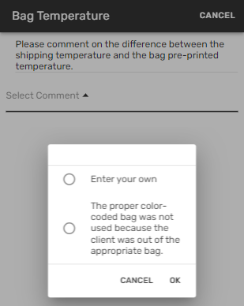
- Select the Select Comment drop-down and select the comment type.
- If selecting Enter your own, you must enter a comment after selecting OK.
Note: The comment must be between 10 and 300 characters.
- Select Save.
Delete a bag
- Select the menu icon next to the bag you want to delete. The Confirm Delete Bag pop-up screen opens.
- Select CONFIRM DELETE.
Unpack a bag
To unpack a bag that has already been picked up and signed for:
- Select the menu icon next to the bag you want to unpack in the Picked-Up Bags section.
- Select Unpack Bag. The Confirm Unpack Bag pop-up screen opens.
- Select CONFIRM UNPACK. The bag is moved to the Unpacked Bags section on the Pack Boxes screen and can be deleted, if needed.
Infectious bag
Infectious bags are generally marked at Room Temperature. If you change the bag temperature to Frozen or Refrigerated, the Infectious Warning pop-up screen displays and you must select ACKNOWLEDGE to continue.
Infectious bags require you to enter a volume in milliliters (ML), which must be a whole number between 1 and 50.
Bag identification
The following icons represent the bag type:
-
 - Room temperature
 -
 - Frozen
 -
 - Refrigerated
 -
 - Infectious
 -
 - Temperature mismatch
 -
 - Invalid bag
Note: If a bag is invalid an error message displays in the Picked-Up Bags section on the Execute Route screen and instructs you how to correct the error.
No bags to pick up
If there are no bags to pick up from a client site:
- Select the upper right menu
 on the Execute Route screen.
 - Select No Bags to Pickup. The No Pickup screen displays.
- Select a comment option from the Select Comment drop-down menu.
- Enter your own (must be between 10 and 300 characters).
- Enter your comments and then sign your signature in the Please sign below... box.
- Client did not have specimens to ship.
- Sign your signature in the Please sign below... box.
- Facility was closed.
- Enter your own (must be between 10 and 300 characters).
- Select OK.
- Select Save. A confirmation message displays.
Note: The data is submitted when the pickup is completed.
Delete a pick up
- Select the upper right menu on the Execute Route screen.
- Select Delete Current Pickup. The Confirm Delete Pickup window opens.
- Select CONFIRM DELETE. Or select CANCEL to cancel the deletion.
Duplicate pick up
If a pick up has already been completed for a client, the Confirm Duplicate Pickup pop-up screen displays after you enter the Client ID.
Select OKAY to start a new pick up, or select CANCEL to stop the pick up.
Unlisted Client
You can select the upper right menu to create an unlisted client, or enter/scan the Client ID. If the ID isn’t recognized, the application creates an unlisted client and takes you to the Enter Client Name screen.
- Select the upper right menu on the Execute Route screen.
- Select Unlisted Client. The Enter Client Name screen opens.
- Enter the client's name in the Client Name field.
Note: The client name must be between 1 and 100 characters.
- Select SAVE CLIENT NAME. The Execute Route screen opens.
- Enter the bag numbers to begin the pick up.